Routers
A router is something a tool calls instead of a model. The tool puts the
router's name in the model field, and the router picks a model for each
request.
Use a router to:
- send small tasks to a cheap local model and hard ones to a large model
- fall back to another model when one is down
- spread requests across several copies of a model
- redact only the requests that go to a hosted model
- switch to the local model once the hosted budget is spent
The steps
A router is a tree of steps. A request enters on the left and ends at a model.
| Step | What it does |
|---|---|
| Route | picks one model from a list |
| Filter | runs one of your filters |
| Budget | counts what passes; over the budget, takes another branch |
| Rate limit | counts requests or tokens; over the limit, takes another branch |
| System prompt | adds an instruction to the requests that pass |
| Model | sends the request to one model |
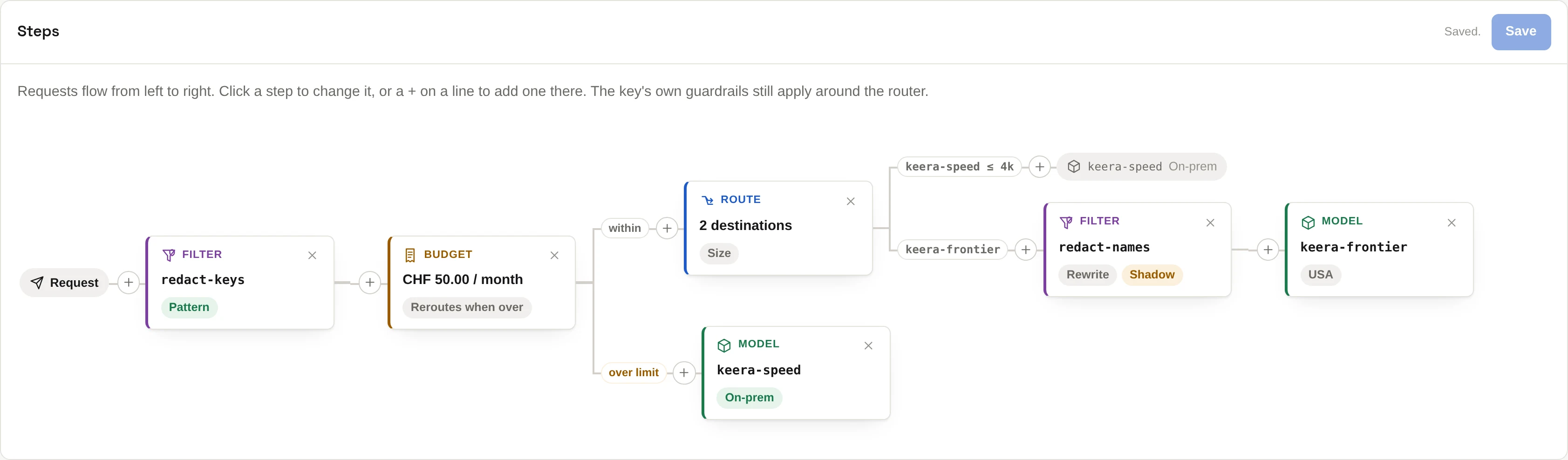
This router removes credentials, sends long requests to the hosted model and short ones to the local model. On the way to the hosted model it also removes client names. Once CHF 50 are spent in a month, everything goes to the local model.
How a route step chooses
| Mode | Picks by | Extra cost |
|---|---|---|
| Instruction | a small model reads the request | one short generation |
| Size | how long the request is | none |
| Fallback | the order of the list, until one answers | none |
| Latency | which model answered fastest recently | none |
| Least busy | which model has the fewest open requests | none |
Only instruction reads what the request says. It reads each model's description, so write good descriptions first.
Create a router
In the panel, open Routers and click Create router. Click a step to change it, or a + on a line to add a step there.
On the command line, a router with one route step:
# Let a small model decide
keera router add auto --model keera-decider \
  --destinations keera-speed,keera-frontier --fallback keera-speed \
  --prompt "Which model should answer this request?" --display-name Auto

# By size: up to 4,000 tokens to the local model, the rest to the large one
keera router add bysize --mode size --destinations keera-speed:4k,keera-frontier

# Fallback: the cluster first, the hosted model when it is down
keera router add ha --mode fallback --destinations keera-speed,keera-frontier
For a whole tree, write the steps as JSON and use --file. keera router show
<alias> --json prints a router in that format, so you can edit it and save it
with keera router set.
When it cannot decide
An instruction step may fail to decide, for example when its model is down. Choose what happens when you create it:
--fallback <model>sends the request there. Good when the goal is saving money.--no-fallbackrefuses the request. Good when the goal is keeping data inside: an unchecked prompt must not go to a hosted model.
Allow the router
A key may call a router only if its guardrail allows it, like a model. Allowing a router allows every model it can send to. To send all of a project's traffic through a router, allow only the router:
keera guardrail set project "Payments Platform" --models guarded
The key's own guardrails still apply around the router. A router can never loosen them.
Check and watch it
Check, or keera router check <alias>, sends sample prompts through each
route step and shows where each went, and how sure the deciding model was.
Mistakes in routing are quiet: every request still gets an answer. So watch the router's screen. It shows how requests were split between models, how often it fell back, and what deciding added to the wait.
A tool can see where its request went in the X-Keera-Router header, such as
auto -> keera-frontier.