Guardrails
A guardrail says what an organisation, a project or a key may do. Set the broad rules on the organisation, and narrow them for each project or key.
What a guardrail holds
| Part | What it does |
|---|---|
| Models | The models and routers that may be called. Empty means "whatever the level above allows". |
| Budgets | The most money to spend per day or per month, in CHF. |
| Rate limits | The most requests or tokens per minute, day or month. |
| System prompt | An instruction put in front of every chat request. |
| Filters | Filters that run on every request. |
| MCP tools | The MCP servers and tools that may be called. |
A level may have several budgets and rate limits, one per period. For example a budget per day next to one per month. Each must hold.
How levels combine
A level can narrow what it inherits, but never widen it.
- Model and tool lists must agree on every level. If the organisation allows
keera-speedandkeera-frontier, a project can allow justkeera-speed, but not a third model. - Budgets and rate limits are counted per level, and all of them apply. An organisation budget of CHF 10,000 and a project budget of CHF 1,000 are two limits.
- System prompts and filters add up, organisation first. A project keeps the organisation's and may add its own.
A level that sets nothing is not unlimited. It gets whatever the level above it sets.
Set a guardrail in the panel
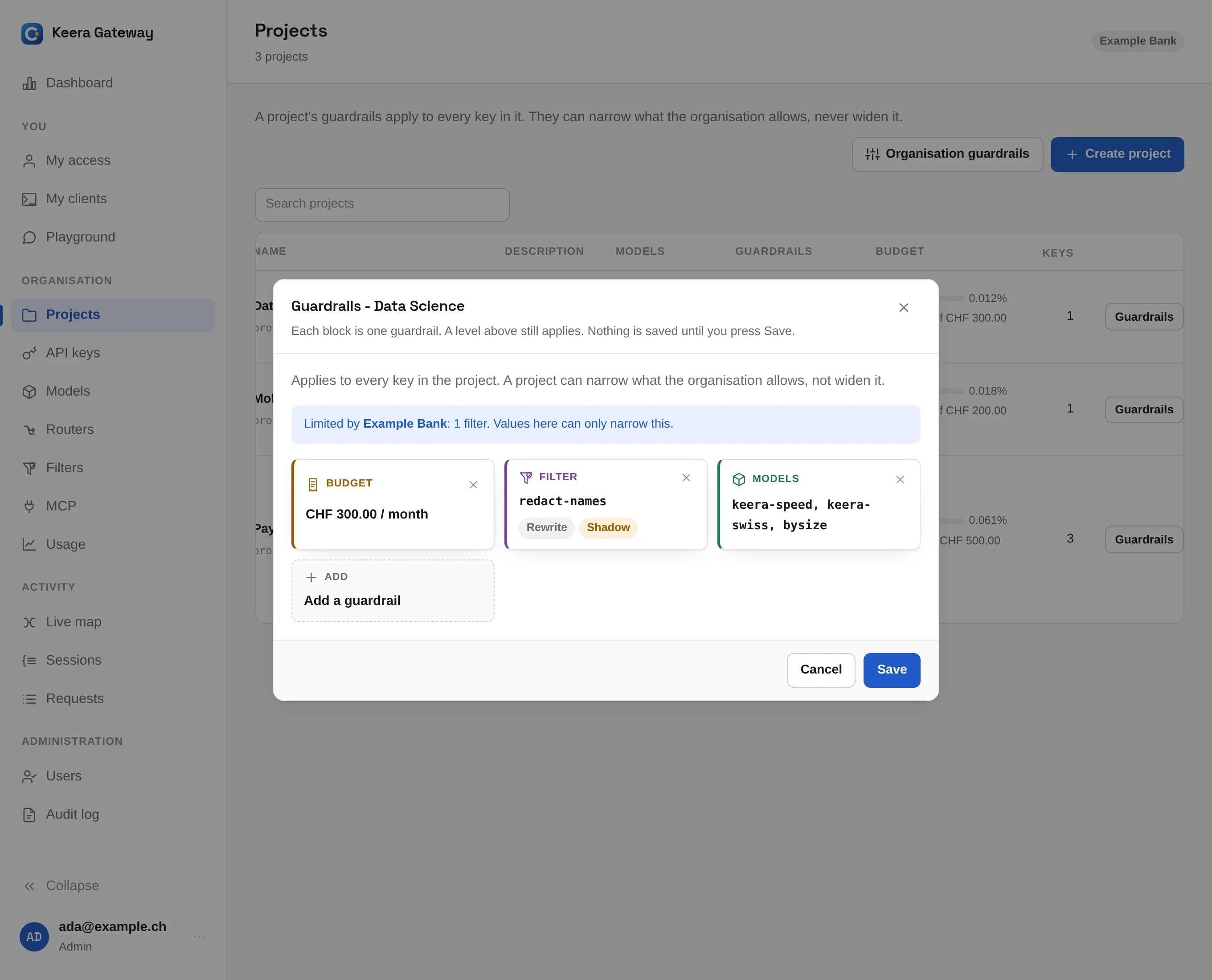
On Projects, click Guardrails on a project, or Organisation guardrails at the top. On API keys, click Guardrails on a key. Each part is a block in the dialog: add the ones you need.
Set a guardrail on the command line
# A project may use two models, 120 requests a minute and CHF 500 a month
keera guardrail set project "Payments Platform" \
  --models keera-speed,keera-frontier --requests 120 --budget 500 --period month

# One key gets CHF 5 a day on top
keera budget key "Ada's laptop" --budget 5 --period day

# A standing instruction for the whole organisation
keera guardrail set org --system-prompt "Answer in English. Never output customer data."
keera limit and keera budget set one part each. With no flags, they show
what is in force.
See what applies
Before you change a limit, check what is in force now:
keera guardrail effective key "Ada's laptop"
This shows the combined result, and which level decided each value. Developers see the same on My access.
Budgets and rate limits in detail
- Budgets reset at midnight UTC (daily) or on the 1st of the month (monthly).
A request over budget is refused with
402, and the message says when the budget resets. - Rate limits per minute refill continuously. Per day or month, they reset
like budgets. A request over the limit is refused with
429and aRetry-Afterheader.
Budget for hosted models
A hosted model without a guardrail is open to every key in the organisation. Give the projects that may use it a monthly budget.